

X Time Machine
Type an X username, yours or anyone’s. CutNoodle travels back exactly one year and brings back the post that account wrote on this day, as a card ready to post.
Public accounts only. Posts are read directly in this tab, with no login. Nothing is saved; public photos may be cached temporarily so they load reliably.
What you get
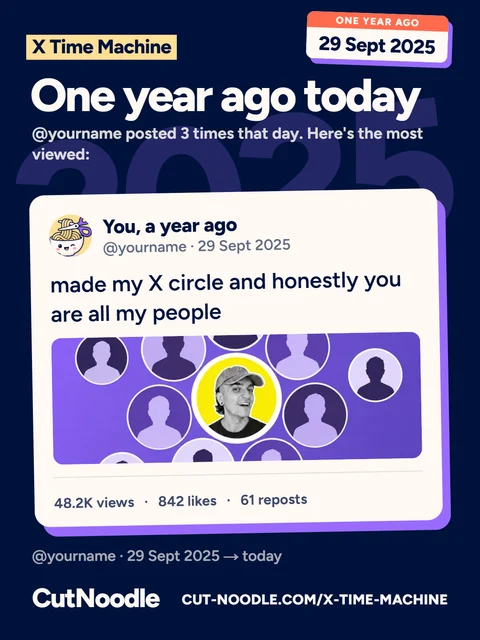
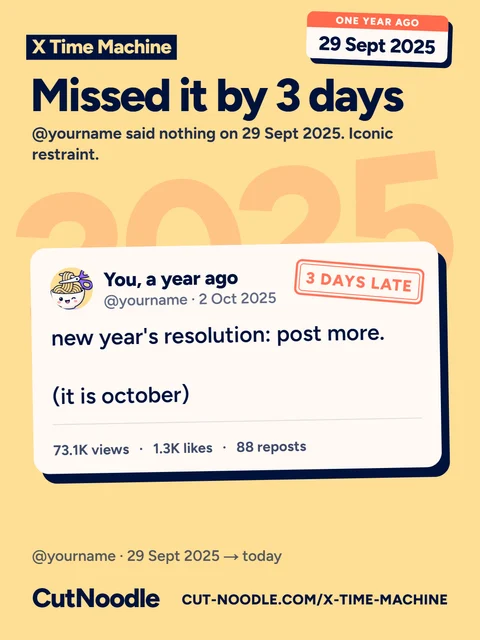
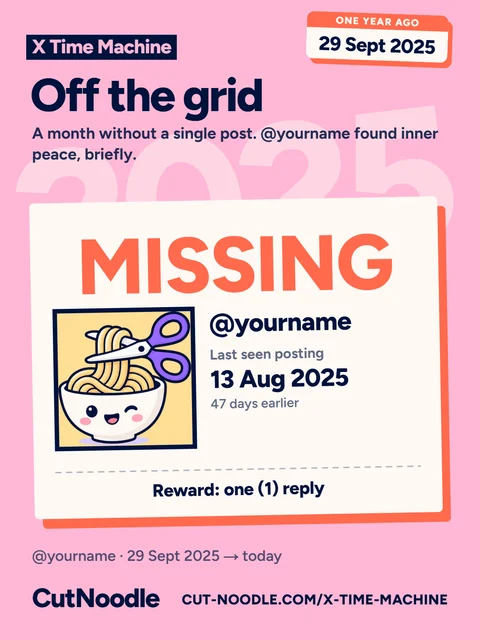
X Time Machine goes back exactly one year on X (Twitter). Type a username and it finds the post that account wrote on this same day last year, then draws it as a card to post, in 3:4 (1080×1440) for a post on X or 9:16 (1080×1920) for a story, in one of four colours: navy, gold, violet or pink.
How it finds the post
It searches the account's public posts by date, the way X's own search does, and keeps only what is certain: posts written by that exact account (checked by its permanent ID, so a renamed or reused username cannot slip in), not reposts, and written on the day it looks for.
The day is today's date one year back, on your calendar, counted from midnight to midnight UTC: the same clock as the times listed next to the card. On 29 February it goes to 28 February. When the account posted more than once that day, the card shows the most viewed post, putting posts and quotes ahead of replies, and the page lists all the others with a link to each.
When there is no post that day
- Missed it by a few days: nothing that day, but something within 30 days. The card shows the closest post, stamped with how early or late it is.
- Off the grid: nothing for 30 days either side. The card is a missing poster: when the account was last seen posting (or came back), its last words when there is room for them, and a modest reward.
- Not born yet: the account was created after that day. The card goes to its very first post, stamped Day one; with no post at all, it is a birth certificate on X.
What it does not do
- It sees public posts only: nothing from private accounts, no likes and no deleted posts.
- It cannot show the old profile photo, name or follower count: X keeps only the current ones.
- It depends on a free third-party service that reads public X posts. When that service's search is down, X Time Machine is too.
Where your data goes
The username you type is sent from this tab to a third-party service that reads public X posts, and the photos load from X's own image server. Only if the profile photo does not load that way does it pass through CutNoodle's image service, which caches public profile photos for a while so they load reliably on phones. The card is drawn in your browser, and neither the search nor the card is saved. The details are in the privacy policy.
Common questions
Do I need to log in to X?
No. X Time Machine reads public posts only, the same ones anyone can see without an account, so there is nothing to log in to and no permission to grant.
Can I use it on someone else's account?
Yes, on any public account. It only shows a post that account already published in public. Private accounts cannot be read.
What if the account posted nothing that day?
Then the time machine misses, and admits it: it lands on the closest post it can find, up to 30 days before or after, with a stamp saying how early or late it is. If there is nothing for a whole month either side, the card becomes a missing poster with the last time the account was seen posting. If the account did not exist yet, it goes to its very first post instead.
Why are the likes and the profile photo from today?
X keeps only the current numbers and the current profile photo. The post, its text and its photo are the ones from a year ago; the counts are what that post has gathered since.
Which post is picked when there are many?
The most viewed post of the day, with posts and quotes ahead of replies. All the posts of that day are listed next to the card, with a link to each.